Mobile Clinical Trials App
Our clinical trials app provides you with quick access to our 250+ cancer clinical trials open for patient participation. The mobile-friendly app is a decision tool to match available research trials with individual patients. To use the app, simply visit the URL below. No login required.
Instructions for App Creation
Open MCT: https://mct.platformx.wisc.edu/mct.php
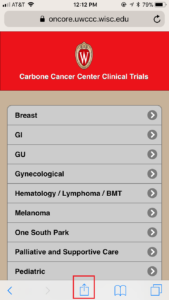
In your browser, with MCT open, click on the icon at the bottom of the screen that looks like a box with an up arrow coming out of it
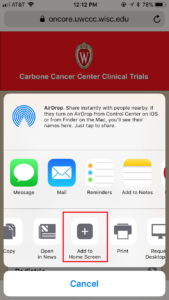
On the menu that pops up, scroll to the right on the row with the black and white icons. Select “Add to Home Screen”
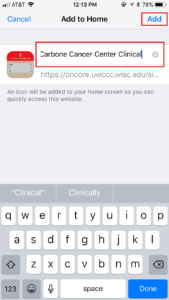
Change the name to whatever you would like. This is what will appear on your home screen. Click “Add”
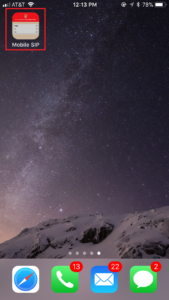
The icon will appear on your home screen like any other app
Open MCT: https://mct.platformx.wisc.edu/mct.php
In your browser, with MCT open, click on the icon at the bottom of the screen that looks like a box with an up arrow coming out of it
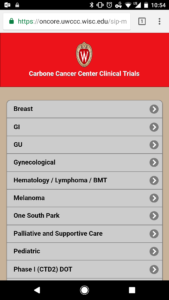
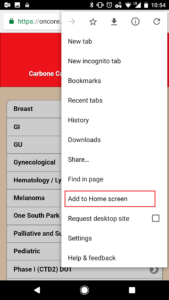
On the menu that pops up, scroll to the right on the row with the black and white icons. Select “Add to Home Screen”
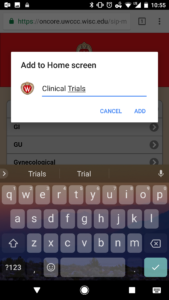
Change the name to whatever you would like. This is what will appear on your home screen. Click “Add”
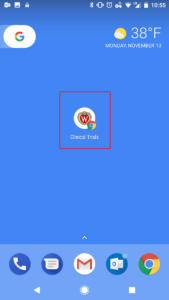
The icon will appear on your home screen like any other app
Trials are grouped by cancer type. Simply click on the specific cancer to see open trials. Then, click on protocol to see key eligibility requirements.
You can also search available trials via protocol search, which allows you to search by any of the following:
- Keyword
- Drug
- Phase
- UW Carbone Cancer Center physician